
What Users Need


The challenge
NHS login supports millions of users accessing digital healthcare services, but discovery research identified widespread confusion between registration and sign-in journeys.
Many users entered the wrong flow, creating duplicate accounts instead of accessing existing ones.
Research findings
Registration confusion
Users unsure whether to sign in or register.
Duplicate accounts
Incorrect journeys created unnecessary accounts.
Recovery barriers
Password and recovery flows caused abandonment.
Support demand
Poor signposting increased avoidable contact.
Outcome
Using behavioural evidence, iterative testing and journey redesign, the work helped validate recommendations for a wider redesign of the NHS login experience.
Client
NHS login is one of the UK’s largest digital identity services, supporting secure access to healthcare systems and patient services across multiple NHS platforms.
The programme involved multiple delivery partners, stakeholder groups and governance teams responsible for the ongoing evolution of the service.
My role across the programme
-
Discovery research
-
Behaviour analysis
-
Journey mapping
-
UX strategy
-
Interaction design
-
Usability testing
-
Accessibility review
-
Stakeholder workshops
Behavioural evidence and iterative testing helped validate recommendations for redesigning critical areas of the NHS login journey.
Key contribution


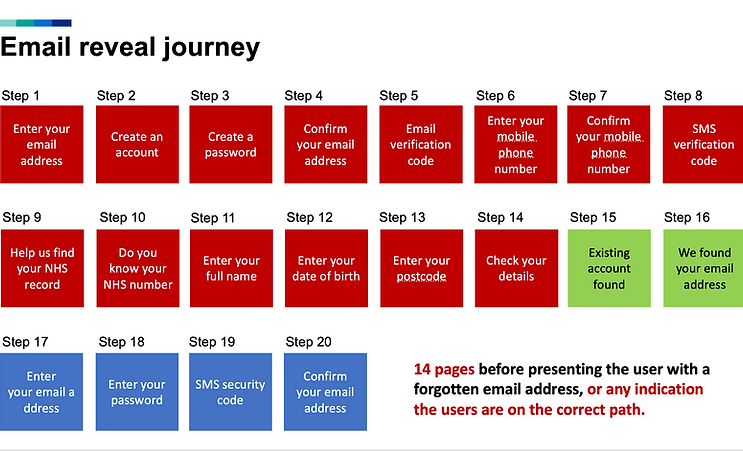
User journey mapping

Empathy mapping


Persona mapping

Low-fidelity wireframing

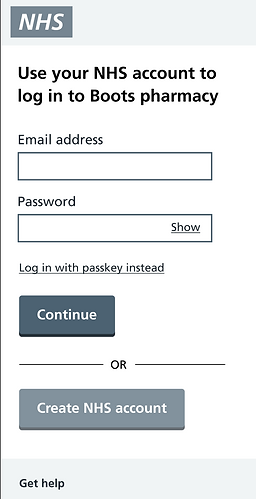



Low-fidelity research user feedback
Validated assumptions
All users tested indicated they now understand how to
'Log in' and how to
'Create an Account'
All users demonstrated what they would do to view the password
as it was typed, ensuring
no typos or spelling errors
All users where able to locate
self-serve links such as
'Forgot email' and
'Forgot password'
Once 'Passkey' was understood all users stated they would have preferred to have had the option to set up this feature during the registration process
Additional problems identified
All users requested to place all help links to the relevant entry field/s anexts this is where they expected to find them
Help links on some of the pages were pushed below the fold resulting in them being missed
Participants requested the help title links use the same language as the problem they are experiencing
Half of the users did not know what a 'Passkey' was.
Requesting additional context
All users where able to navigate to a location to receive additional help and support
 Army |  MET Police |  ASDA Recipes |  Bank of England |
|---|